
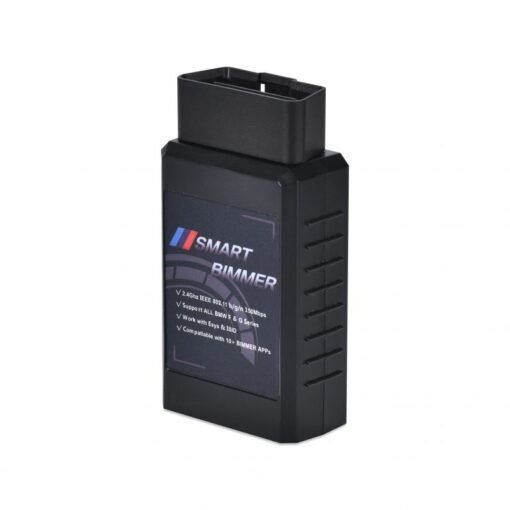


SmartBimmer Enet WiFi Adapter Wireless ENET for BMW
Tired of coding your car in extreme weather? The Enet WiFi Adapter lets you work from the comfort of your mobile device. Enjoy professional BMW coding, flashing, and diagnostics without the cables.
Product Overview
The SmartBimmer Enet WiFi Adapter is the ultimate wireless tool for BMW F, G, and I Series, and Toyota Supra. It’s 10x faster than a standard K+Dcan cable and 2.5x faster than older WiFi adapters. (Note: Not compatible with BMW E-Series).
Simply plug the Enet WiFi Adapter into the OBDII port, connect your device to its WiFi network, and start coding, logging, or reading codes instantly. Your phone’s LTE/4G, Bluetooth, and charging capabilities remain active.
This adapter works seamlessly with ESYS 3.35.3, EsysPlus 3.8, and all popular Bimmer apps.
Key Features of the Enet WiFi Adapter
- Embedded UART-ETH-WIFI module for stable connectivity
- DC/DC converter for optimized power use
- CPU heat sink for over-temperature protection
- 2.4GHz 802.11b/g/n WiFi (Default Password: 12345678)
- Supports TCP/UDP/DNS/DHCP/HTTP protocols
- WEP/WPA-PSK/WPA2-PSK security authentication
How to Use Your Enet WiFi Adapter
- Plug the adapter into your car’s OBDII port.
- On iOS: Enable Airplane Mode, turn off Bluetooth, then turn on WiFi.
- Disable CarPlay in your iOS settings.
- Connect your device to the adapter’s WiFi network.
- Open your BMW app (e.g., BimmerCode, MHD) and select the correct adapter.
- Start coding or diagnosing!
Compatible Apps
The Enet WiFi Adapter works with: BimmerCode, BimmerLink, MHD, xHP, Thor, Protool, MG Flasher, BootMod3, XDelete, and more.
Connect with a Laptop
For laptop use, connect to the adapter’s network and manually set your IP address to 192.168.16.150 (Subnet Mask: 255.255.255.0).
Disclaimer
BMW and MINI are registered trademarks of BMW AG. SmartBimmer is not affiliated with or endorsed by BMW AG.
Be the first to review “SmartBimmer Enet WiFi Adapter Wireless ENET for BMW”
You must be logged in to post a review.
Related products

Uncategorized
Uncategorized
Uncategorized
Uncategorized
Uncategorized
Uncategorized
Reviews
There are no reviews yet.